Private beta: we are looking for design partners
Video Context

Video Context for news

Turn live broadcasts into social content. Automatically.

Video Context watches your live feeds, finds the moments worth sharing, clips them, captions them and sends them where they need to go — while you’re still on air.

Join the beta
Frames
speaker_1 · ministerSpeaker
micphoneMicrophones

speaker_1“We will publish the housing plan next week.”

Speech
introquoteQ&Aquote
Moments
presser_live_0412.mp4 → context.jsonwatching
{
"video_id": "feed_0412", "type": "press_conference",
"speakers": [ { "id": "speaker_1", "role": "minister" } ],
"objects": [ "microphone", "phone" ],
"quotes": [ { "t": 84.2, "text": "We will publish the housing plan next week." } ],
"moments": [ { "start": 84.2, "end": 97, "topic": "housing" } ]
}

We help newsrooms get video content out faster. Every live feed is transcribed, tagged by speaker and topic, and searchable as it records. Key moments are auto-edited into captioned clips, ready for every platform, so your team does not spend twenty minutes scrubbing. Search decades of archive in plain words, and publish while the story is still breaking.

Who it is for

You should be here if…

  • 01

    You need clips on social while you are on airand your editors cut them one at a time.

  • 02

    Your live feeds run all dayand most moments worth sharing are never clipped.

  • 03

    You publish on every platformand each one needs its own size and captions.

  • 04

    Your editors spend hours cutting clipsinstead of telling the story.

  • 05

    Your archive goes back decadesand that footage could become clips for today’s stories.

  • 06

    You want social output on autopilotevery key moment clipped, captioned, and sent.

Why newsrooms need it

A newsroom records far more video than any team can watch. Live feeds, press conferences, field footage, and decades of archive all arrive as files with a name and a date, and nothing else. When a story breaks, social needs clips now. An editor scrubs for the moment, cuts it, captions it, and posts it, one clip at a time.

Video Context does that work for you. It watches every feed as it records, and writes down who speaks, what they say, and what is on screen. It finds the moments worth sharing, edits each one into a captioned clip, and sends it where it needs to go, while you are still on air.

How it works

  1. Connect your live feeds and your archive storage.
  2. Video Context transcribes, tags speakers, and finds the key quotes and moments as they happen.
  3. Video Context auto-edits each moment into a captioned clip for each platform.
  4. Automations send each clip to your social channels or to your team for approval.
  5. Editors search the live feeds and the archive in plain words when they need a different shot.

What changes

  • Clips go out on social while the broadcast is still live.
  • Each key moment is cut, captioned, and sized for each platform, with no manual edit.
  • One live feed becomes dozens of clips, not one or two.
  • Your editors approve clips instead of making them.
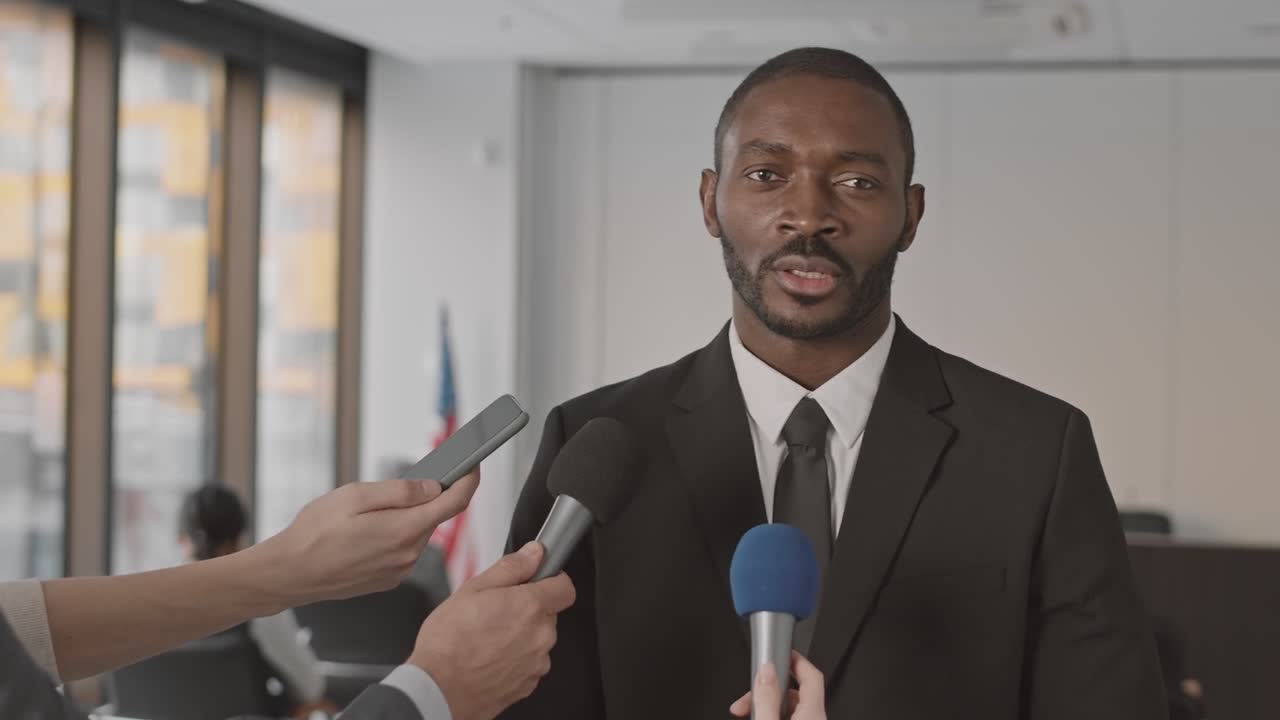
Watched by Video Context

Morning press conference

Live feed · 42 minutes · 3 speakers

  • 14:02“We will publish the housing plan next week.”Clip · 0:18
  • 14:09Reporter presses the minister on the budgetClip · 0:32
  • 14:17New figures for first-time buyersClip · 0:24
  • 14:26Minister leaves the stageClip · 0:09

✓ Each clip is captioned and ready for social 30 seconds after the moment.

Speed

Super fast. At any scale.

Other tools watch a video frame by frame. We read every layer at once, so your insights are ready while they are still watching.

Time to process the same video · shorter is faster

  • Video Context✓ fastest
  • Cloud video AI API4× slower
  • Multimodal LLM8× slower
  • Frame-by-frame vision16× slower

Every layer at once

not frame by frame

One API call

for all of the data

Any scale

from one video to a whole archive

Illustrative comparison for the private beta. We will publish the full method and the results.

You’re in safe hands

Deploy anywhere. Keep control.

Our cloud

Call the hosted API. Nothing to run or scale.

Your cloud

We deploy into your AWS, GCP, or Azure account. Your video stays there.

Your servers

Run it on your own GPUs. No data leaves your network.

Built for agents

Ask for the outcome. Agents do the rest.

Video Context gives ChatGPT, Claude, Gemini, or your own agent the tools to watch, search, and edit video. One request becomes a finished job.

Works withChatGPTClaudeGemini
  1. Clip every key moment from the minister’s press conference, caption the clips, and send them to social for approval.
  2. find_moments(feed_0412 · live)5 key moments
  3. create_clips(5 moments · 9:16 · 16:9)10 clips
  4. add_captions(10 clips)captioned
  5. send(#social-approvals)sent
  6. Done. 5 key moments, auto-edited into 10 captioned clips for vertical and landscape. Social has them for approval.

    0:30

    minister_presser_clips.zip

    09:1211:4014:0214:1716:31

FAQ

Questions, answered.

Common questions about Video Context for news.

Does Video Context edit the clips automatically?+

Yes. Video Context finds each key moment, cuts it into a clip, adds captions, and makes a version for each platform. No editor needs to touch it.

Can our team approve clips before they go out?+

Yes. You can send each clip straight to your social channels, or to your team to approve first.

Does it work on live feeds?+

Yes. Video Context processes footage as it arrives, so clips from a live feed are ready while you are still on air.

Can it make clips from our archive?+

Yes. Video Context can index archive footage as well as new footage. Editors search it in plain words and make clips from any moment.

Can we keep our footage on our own infrastructure?+

Yes. You can use the hosted API, deploy into your own cloud account, or run it on your own servers.

Your videos contain
valuable data.
Start using it.

Analyse video at scale. Find exactly what you need. Give your products and AI the context to act on it.